
Working with Songs in Setlist Helper for iOS
The Songs page is a master list of all the songs in your repertoire. Songs will be the first view that appears when you open the app. If you are not on that page, open the main menu of the app and tap Songs.
Adding a Song
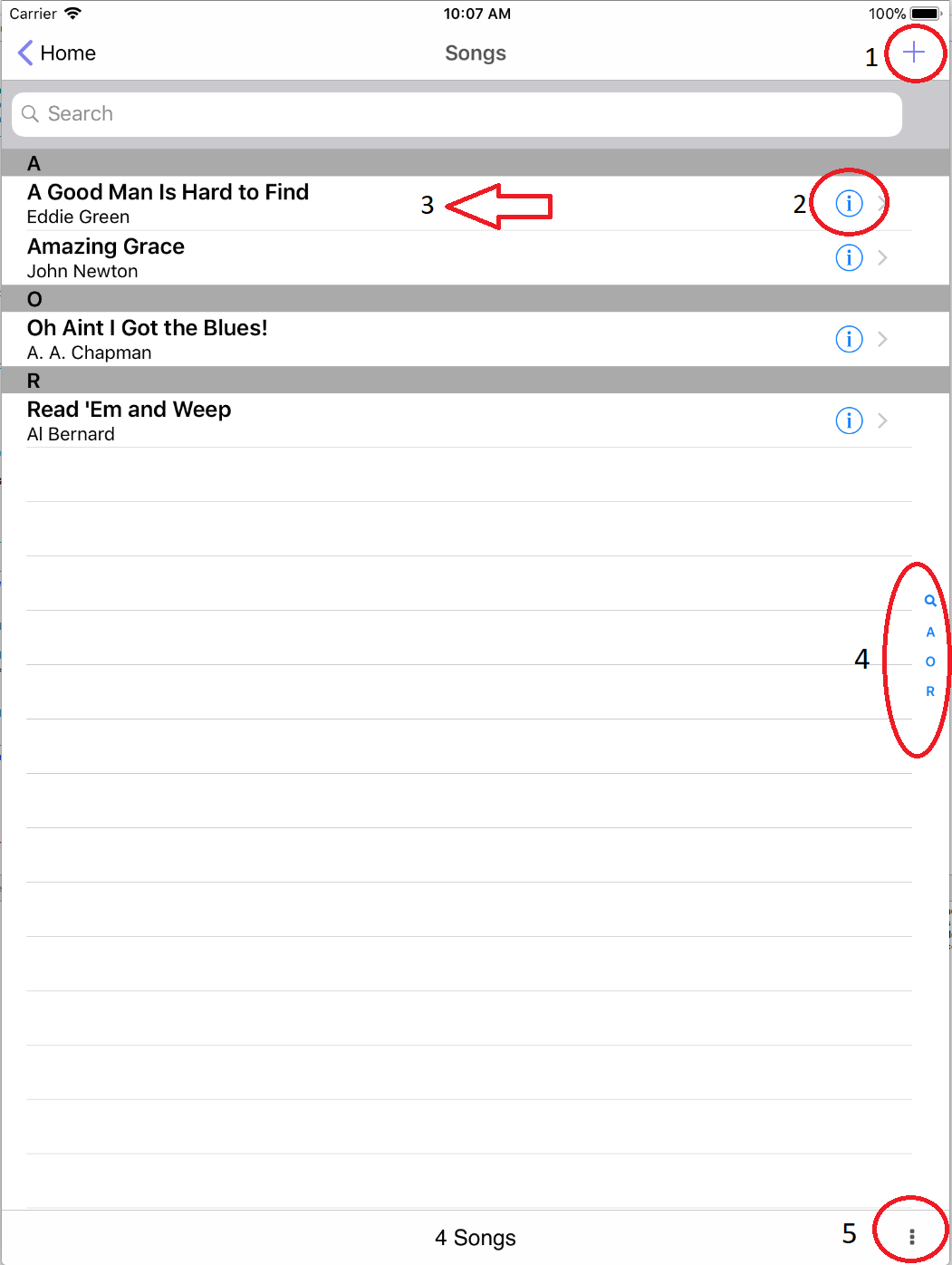
Tap the plus button at the top of the Songs page (#1). This will open the "Edit Song" page shown below. Fill in all the data you require on this page.
Editing a Song
To edit the song attributes of an existing song, tap the information button (#2).
Deleting a Song
Swipe the song in the Songs list right to left with one finger (#3). When you do this, the "Delete" button will appear as shown below. Tap that button and the song will be deleted.

If a song is deleted and the song is contained in a setlist, the song will not be deleted permanently. The song will be marked as deleted so it will not appear in the song list, but it will still be in the setlist.
Navigating the Song List
On the right side of the screen, you will see the first letter of the songs in alphabetical order. Tap your finger over the characters on the right that you want to navigate to. The view will scroll to the character you stopped on.
Bottom Bar of the Songs Page
The Songs page will contain the song count of all the songs in the list.
On the right of the toolbar is a button that will show you more actions (#5). The actions are:


Copyright © 2026 www.setlisthelper.com