 Setlist Helper
ChordPro Format Support
Setlist Helper supports ChordPro format (also known as Chopro format). Below are the supported directives.
If your lyrics have the chords written on the line above the words, you do not need to retype them. Open the song in your Song Catalog, click "View Lyrics or Add Lyrics", and use the Convert to ChordPro button to convert them in place.
There is also a free online converter at bandcentral.com/tools/chordpro-converter. Paste in chords-over-lyrics text, for example from a tab site, and it gives you back clean ChordPro. No account is needed.
The directives listed below are wrapped in curly braces ({ and }). Upper or lower case is not significant:
{title: title string} ({t:string})
Title of the song.
{subtitle: subtitle string} ({su:string})
Specifies a subtitle for the song that will be displayed below the title.
{key: x}
The key of the song.
{tempo: x}
The tempo of the song.
{start_of_chorus} ({soc})
Indicates the start of a chorus. This will show "Chorus" in bold, indent the chorus, and add a black line to the left of the chorus so it can be identified more easily.
{end_of_chorus} ({eoc})
Marks the end of a chorus.
{start_of_bridge} ({sob})
Indicates the start of a bridge. On Android (4.74 and later) this shows "Bridge" in bold and formats the section like a chorus.
{end_of_bridge} ({eob})
Marks the end of a bridge.
{comment: string} ({c:string})
Shows the string following the colon as a comment. Do not confuse this with the # sign comment. Lines starting with # are not shown.
{pause:xx}
Used to pause auto-scroll in the app. Replace xx with seconds or minutes.
{scrollspeed: x}
Sets the starting auto-scroll speed for the song in the app, for example {scrollspeed:7} or {scrollspeed:7.5}. Changes you make with + and - while the song scrolls are saved and are not reset by this tag.
{pagebreak}
This is only for the www.setlisthelper.com website. Add the {pagebreak} tag to your lyrics to make the printer go to a new page when printing.
{start_of_tab} ({sot})
Indicates the start of a guitar tab section. The text will be formatted in a fixed-width font until the end_of_tab directive appears. This can be useful for creating a tab drawing with ASCII text.
{end_of_tab} ({eot})
Indicates the end of the guitar tab section.
{soh} ({start_of_highlight})
Start highlighting lyrics. The highlight can cover part of a line, a whole line, or several lines, and it works with or without chords. Chords inside the highlight are highlighted too. Plain {soh} uses the highlight colors from Format Lyrics in the app (yellow unless you have changed it).
{soh: color}
Start highlighting in a color you choose, for example {soh: red}, {soh:#ff8800} or {soh color="blue"}. The long form works too: {start_of_highlight: gold}. Available on Android 4.74 and later. See Color highlights below.
{eoh} ({end_of_highlight})
End highlighting lyrics.
Color highlights
Give each part of a song its own color so everyone can see their part at a glance. For example, background vocals in light blue, a harmony in orange, and a cue like a solo or a stop in red. Each highlight starts with {soh: color} and ends with {eoh}:
[Verse 1]
[G]I can hear you [C]calling {soh: lightblue}(calling out to me){eoh}

[Chorus]
[C]{soh: orange}Harbor lights, [G]shine on me
[D]Lead me back where I [Em]ought to be{eoh}
[C]Harbor lights {soh: lightblue}(ooh, shine on){eoh}

{soh: red}Guitar solo, 8 bars, drums drop out{eoh}
{soh}Last chorus twice, hold the final G{eoh}
Here is how that song looks on Android:
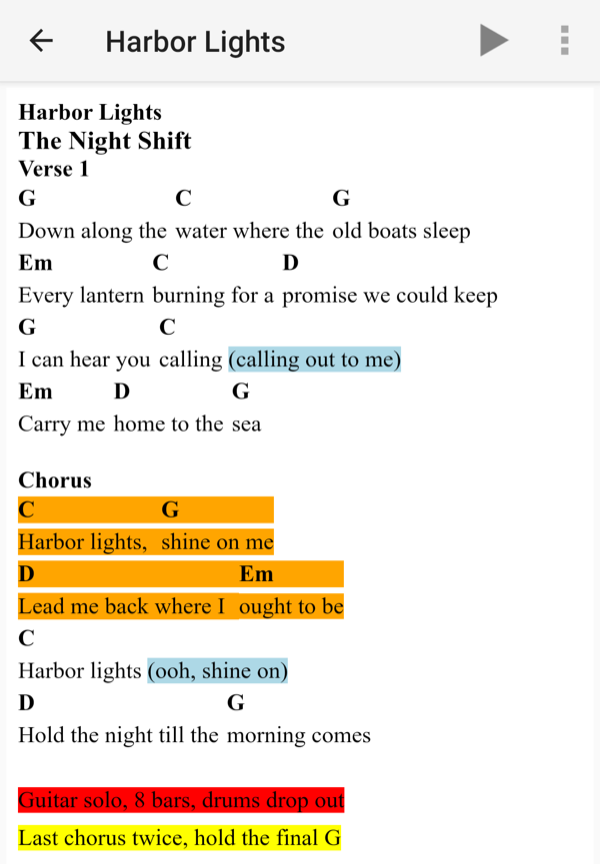
Setlist Helper 4.74 on Android with color highlights.
- Colors: use a color name (red, orange, gold, yellow, lightgreen, lightblue, skyblue, pink, violet and so on, any standard web color name) or a hex code such as
#f80or#ff8800. - Three ways to write it:
{soh: red},{soh:#ff8800}and{soh color="blue"}all work. - Readable text: the text turns black or white automatically, depending on how light or dark the color is.
- Unknown colors: if the app does not recognize the color, it uses your normal highlight color.
- No chords needed: highlights work on plain lyrics too.
Which apps show the colors: color highlights need Setlist Helper for Android 4.74 or later. On the website, highlights show in yellow and the color is ignored. On iPhone and iPad, color highlights are coming in a future update. Until then the iPhone and iPad app does not understand the color, so a tag like {soh: red} can show up as text in your lyrics. If you also use an iPhone or iPad, stick to plain {soh} for those songs for now.
Chords
Chords are delimited by square brackets ([ and ]). Sharp is indicated by a # (hash) and flat by a b (lowercase B). Recognized chord forms:
[A-G]{#|b}{m|dim|maj|sus}{digit}{/[A-G]{#|b}}

Examples: [A] [C#m7] [Bb/D]
Chord Grids
Chord grids are not supported yet. If this is something you would like to have supported, please email tim@setlisthelper.com.
Comments in the File
Lines in the file that have # as the first character are considered comments and will never be printed.
Example
{t:Honky Tonk Women}
{st:Rolling Stones}
#HONKY TONK WOMEN ROLLING STONES
#
#
I [C]met a gin soaked barroom queen in [F]Memphis,
she tr[C]ied to take me upstairs for a r[G]ide.
She h[C]ad to heave me right across her sh[F]oulder,
cause [C]I just can't seem to dr[G]ink you off my m[C]ind.

It's the H[G]onky Tonk W[C]omen,
give me, give me, g[G]ive me the honky tonk bl[C]ues.